Audit logs record transactions performed by the Collective. They provide a definitive record of all accesses and administrative actions, giving you a complete audit trail. Audit logs do not include the same level of detail as daemon logs. Although you will see audit logs from cz-configd such as appliance_status_changed, audit logs alone are not an adequate means of monitoring Collective health.
Audit logs are generated by appliances but are not queried or viewed locally, They are typically aggregated by the LogServer or the LogForwarder and then exported.
Log handling
Audit logs are written to a local database within each appliance using logd. Logd manages storage and can hold up to 100,000 audit log records. This local buffer is not permanent storage—logs must be forwarded to an external system for permanent storage and analysis. This limit can be increased using the SSH command line cz-config command. If logs cannot be forwarded, or the forwarding rate is insufficient, the dashboard displays a warning when 40% of the allowed storage is full.
There are three options for sending logs: the LogServer, the LogForwarder, or Rsyslog. Regardless of the option chosen, audit logs are always sent to Rsyslog so they can be exported from the appliance in real time along with the daemon logs. Unlike daemon logs, audit logs are stored in syslog to preserve audit trail integrity during outages and upgrades. This storage has a daily limit and a maximum duration of seven days. An additional 1 GB buffer is available per configured destination. Neither of these constitutes guaranteed log storage. If no Rsyslog destination is available, these logs will be lost..
Log quantity and rate are both important parameters to consider when planning a deployment. The primary source of audit logs is IP access audit logs from vpnd, generated when a user connects to a protected host. By default, a new record is generated for each open connection every 120 seconds. This can produce a large number of records: 5,000 users with 10 connections to four Sites over eight hours would generate almost 50 million audit log records. To manage this volume, you can set the IP access audit log interval by Site.
You can also disable IP access logging for a Site by setting the interval to 0. This is useful when combined with other Site-based settings, such as when:
Route all traffic through tunnel is used and a specific Site is the destination for all default Gateway traffic. This is likely to be uncontrolled, with many web pages opening 10s of embedded links all generating audit logs.
Alternative default route for all user traffic is used and all traffic is directed to a different default Gateway. This is done when traffic needs to be filtered or processed by another network appliance, which may also perform audit logging.
Log format
The log records are sent in JSON format:
{
    "version": 2,
    "date": "<MMM dd HH:mm:ss>",
    "timestamp": "<ISO 8601 UTC>",
    "hostname": "<hostname>",
    "daemon": "cz-controllerd",
    "log": {
        "authentication_type": "Client",
        "claims_token_id": "<GUID>",
        "client_ip": "<IP>",
        "collective_id": "<GUID>",
        "collective_name": "<name>",
        "distinguished_name": "CN=<device ID>,CN=<name>,OU=<OU>",
        "distinguished_name_device_id": "<device ID>",
        "distinguished_name_ou": "<OU>",
        "distinguished_name_user": "<name>",
        "id": "<GUID>",
        "timestamp": "<ISO 8601 UTC>",
        "user_claims": {
            "ag": {
                "deviceId": "<GUID>",
                "distinguishedName": "CN=<device ID>,CN=<name>,OU=<OU>",
                "identityProviderId": "<GUID>",
                "identityProviderName": "<name>",
                "loginTime": "<ISO 8601 UTC>",
                "passwordWarning": false,
                "username": "<name>"
            },
            "emails": [
                "admin@email.com"
            ],
            "firstName": "<name>",
            "id": "<GUID>",
            "lastName": "<surname>",
            "tags": [
                "builtin"
            ],
            "username": "<username>"
        },
        "version": 22
    }
}
Log records include the collective_id field, which identifies the source Collective when multiple Collectives send logs to one external SIEM. Log records also include the hostname field (recorded as log_source in LogServer, OpenSearch, and Elasticsearch), which records the hostname of the appliance that generated the log record.
When you use auto-scaling scripts, this field may display a value derived from the instance ID assigned by the cloud provider, which may appear random.
For complete examples of how specific audit logs are formatted, see Audit log flow.
For details of the fields included in every type of audit log, see Audit log detail.
Log persistence modes
AppGate ZTNA supports three audit log persistence modes: Guaranteed, Default, and Performance. Configure these modes in Global Settings.
In Default mode, Logd uses a database to manage audit log writes to disk and batches records in one-second intervals. This ensures the number of unwritten (potentially lost) logs never exceeds one second plus any write delay in the disk subsystem.
Performance logging works the same way as Default mode, except it writes to RAM instead of a physical disk. This significantly increases write speed and reduces IOPS load on the disk subsystem. Ensure your system has sufficient RAM (up to 1 GB) before enabling this option.
If Guaranteed logging is enabled, all daemons in the AppGate ZTNA system demand that each audit log record is written before allowing an action. The daemons will wait for an acknowledgement from logd before proceeding. The daemons attempt to connect to logd multiple times and logd attempts to write to disk multiple times. On a well-performing system, this effectively guarantees that each audit log record is written. The downside is that on a slow system, daemons may wait up to five seconds (the give-up threshold) before continuing, which can significantly impact performance. Enable this feature only when a specific audit or security requirement mandates it, and only on hardware appliances or systems where disk performance is controllable (for example, an SSD with high IOPS).
LogServer
AppGate ZTNA includes a built-in LogServer function that uses OpenSearch. The LogServer is an appliance that collects logs from the other members of the Collective, providing an audit trail of actions and user access. Only one LogServer can be deployed, so HA configuration is not supported. Its primary use case is to assist with initial setup, configuration, and evaluation. It is also suitable for smaller-scale production deployments.
Audit logs using LogServer
Audit logs are fed to the LogServer and Rsyslog, where they combine with other logs.
Using the internal LogServer
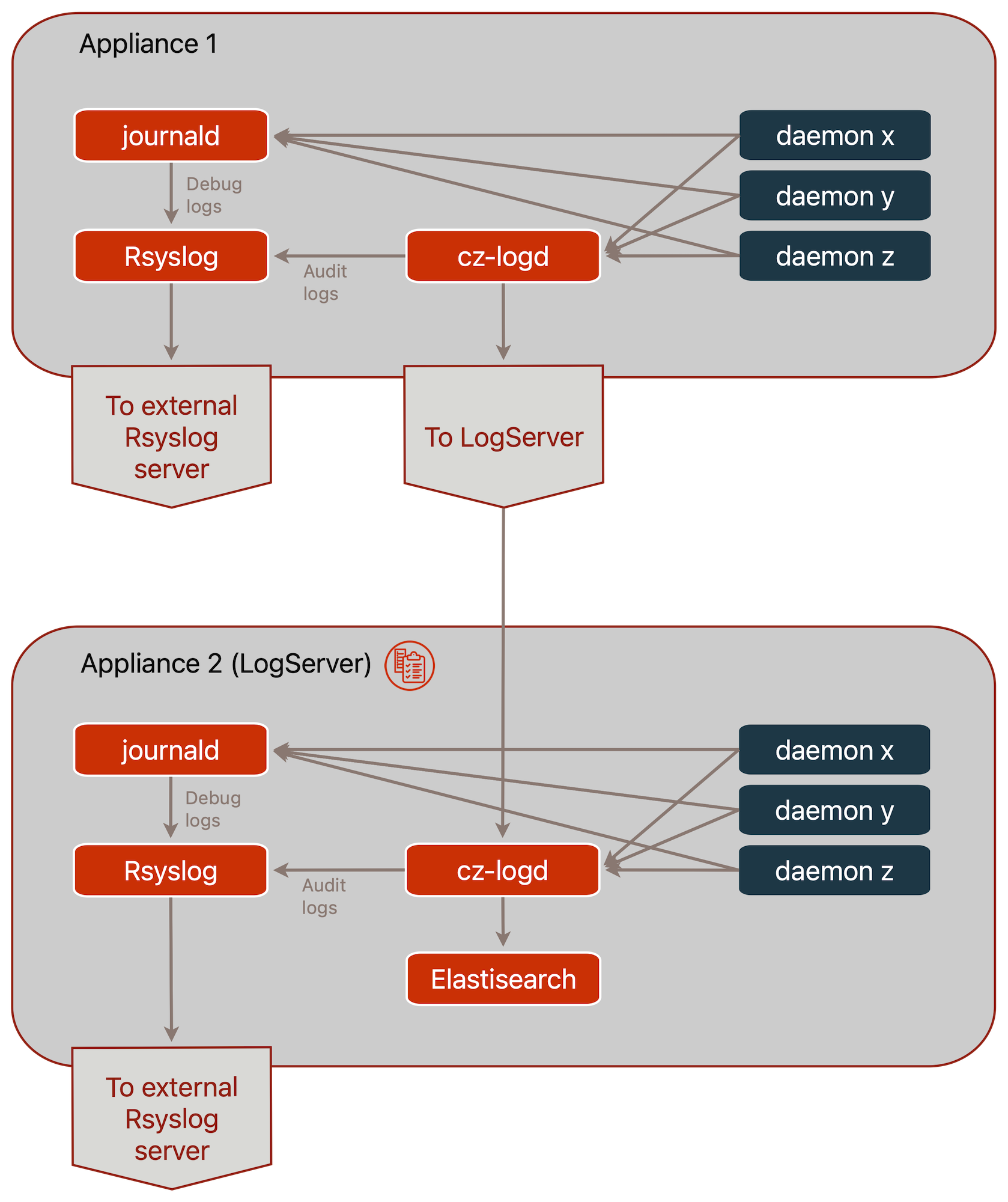
Audit logs are not stored or viewed on individual appliances. Instead, AppGate ZTNA sends audit logs to the LogServer in real time, so the number of unsent audit logs on any appliance at any given time is minimal.
The internal LogServer is based on OpenSearch, which can consume significant resources. Run the LogServer on a separate appliance in production environments.
Do not rely on the internal LogServer as the only means of collecting and reviewing audit logs in enterprise environments. The LogServer is not available in a high availability (HA) configuration. If the LogServer becomes unavailable — for example, due to disk failure — all log records stored on it are lost.
When you configure a LogServer, it receives logs from all sites and all appliances in the Collective. AppGate ZTNA sends audit logs over HTTPS on port 443, which ensures log record integrity and security.
In the following situations, audit logs cannot be sent for a period of time:
When Rsyslog and LogServer are both configured, both destinations must be reachable before the appliance sends logs. This guarantees the consistency of system logs.
When the LogServer or Rsyslog destination is taken offline, for example during an upgrade.
During a network outage.
In these situations, cz-logd stores up to 100,000 audit log records by default and sends them as soon as the issue is resolved.
Access the LogServer UI (OpenSearch) from the Controller admin UI under Users & Devices > Audit Logs. The LogServer does not need to run on that Controller.
When you use the internal LogServer, audit logs are stored in the LogServer database without data replication. The backup utility creates a snapshot of the current audit logs, which you can save off-appliance.
Viewing audit logs
A key requirement when viewing audit logs is the ability to track user and device history. AppGate ZTNA does not use a session ID because it is a distributed system that collects log records from multiple appliances in the Collective. Instead, AppGate ZTNA uses a distinguished name — a combination of machine, username, and identity provider (IdP) — as the unique identifier included in all audit log records, regardless of how many Controllers or Gateways the user or device uses.
Each audit log record also includes the Collective ID. When logs from multiple Collectives are consolidated, the Collective ID identifies the source Collective.
LogServer retention period
When you create a LogServer, set the audit log retention period in days. The default retention period is 30 days. Log records older than the retention period are deleted.
If you set a longer retention period, AppGate ZTNA saves logs until the disk is full, after which the LogServer stops writing new log records.
Using an external Rsyslog server
Each appliance can export all logs — audit and daemon — using Rsyslog. When the LogServer is in use, you cannot also configure a LogForwarder function within the Collective. In that case, Rsyslog is the only means of exporting audit logs.
To export appliance logs using Rsyslog, configure the <Rsyslog Destinations> field on each appliance. For configuration details and examples, see Appliances > Miscellaneous. You can also configure secure log transfer using Rsyslog, but this requires manual configuration on both the sending and receiving ends.
LogServer production use parameters
When you use the LogServer in production environments, it must meet the following parameters for full support. Six key areas define the operational boundaries of the LogServer:
Appliance. Do not run the LogServer on the same appliance as a Controller in a production environment. Deploy the LogServer as a separate appliance.
Retention period. The LogServer is not designed to handle large record sets. Set the audit log retention period to a maximum of 45 days in production use. Exceeding this limit can cause the system to become slow due to internal data storage representation.
Data size. The audit log data set must not exceed 100 GB. Exceeding this limit may affect the operation of the AppGate ZTNA system, for example during backups.
Search. The LogServer requires CPU and RAM to perform searches. The minimum requirement for production use is 4 vCPU and 16 GB RAM. Performing large or complex searches in production can affect the ability of the LogServer to process incoming log data.
Data rate. The LogServer is the single destination for all log records in the Collective and is therefore a bottleneck. To ensure the LogServer handles the volume of log records sent by multiple Gateways:
Use a fast-write disk, such as an SSD on hardware or the high-performance virtual or cloud equivalent.
Do not reduce the IP access audit log interval below the default of 120 seconds, set in System > Sites.
The maximum supported user count for production use is approximately 1,000 users.
Integrity. The LogServer is not suitable for environments that have a compliance requirement to permanently retain audit log records.
High availability: The LogServer is not available in an HA configuration. While the system buffers logs during events such as upgrades, use an external backup solution to obtain failure resiliency.
Backup: AppGate ZTNA supports backing up audit log records. If you perform a restore, all log records created since the backup are overwritten and lost.
LogForwarder
For large-scale enterprise deployments, use the LogForwarder appliance. It handles logs within the Collective and exports them to an external enterprise-class logging system using a choice of protocols.
LogForwarders can be configured for HA operation using two or more appliances and can export logs by Site to different destinations. Multiple export protocols can be specified simultaneously, including one for the ELK stack. To retain an ELK stack in an enterprise environment, deploy it outside the AppGate ZTNA Collective—for example, in AWS—and configure the LogForwarder to forward logs to the ELK stack and export log data to an enterprise-class logging system.
Audit logs using LogForwarder
AppGate ZTNA sends audit logs to the LogForwarder—or to the external log server, when the appliance is itself a LogForwarder—and to Rsyslog, where they combine with other logs. To view the log destination for each appliance, select its Status in the dashboard.
Using LogForwarders
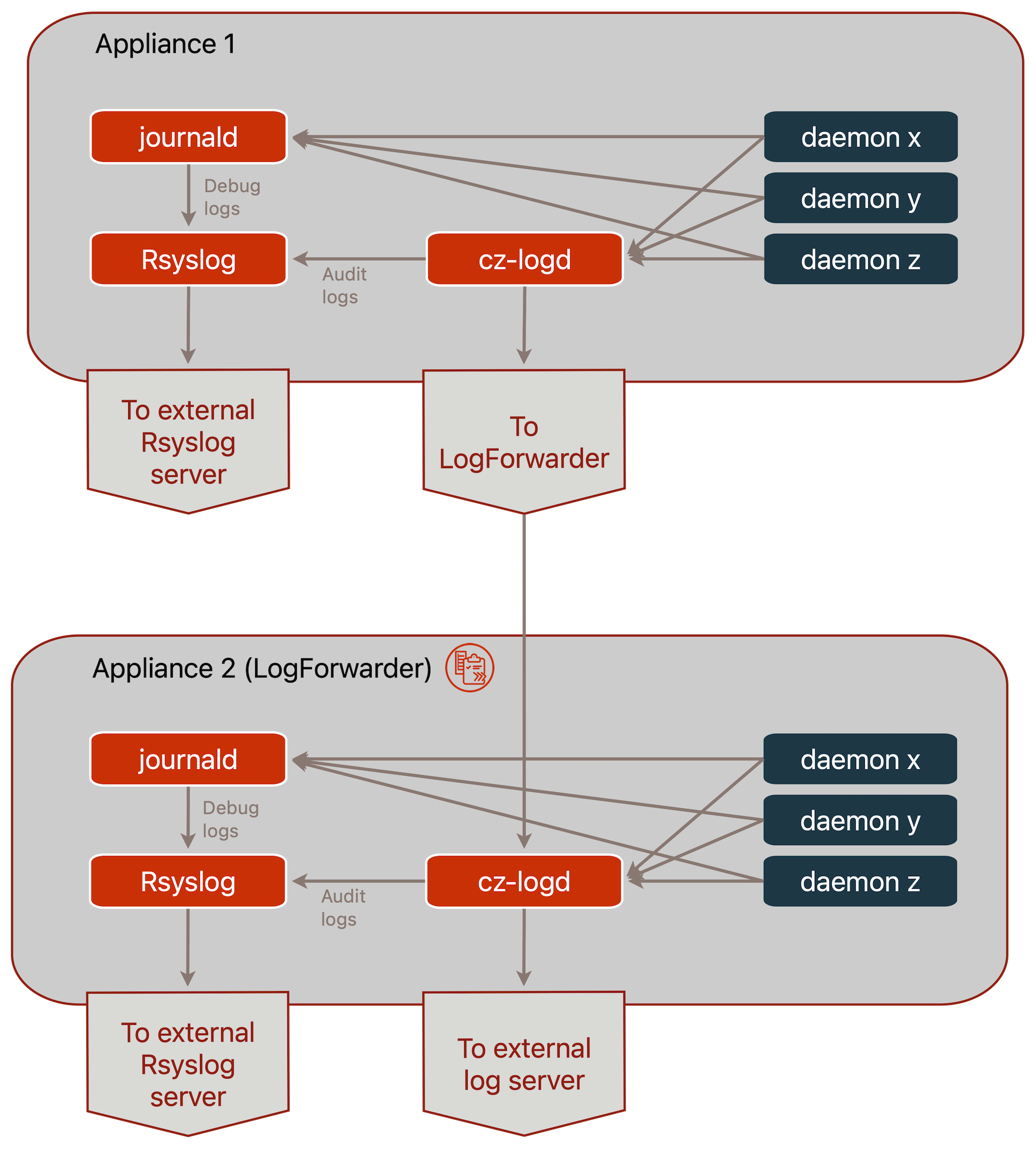
Audit logs are not stored or viewed on individual appliances. Instead, AppGate ZTNA forwards audit logs to the LogForwarder in real time, so the number of unsent audit logs on any appliance at any given time is minimal.
The LogForwarder is a forwarding service based on the same log forwarding daemon used in all appliances. In enterprise environments, deploy two or more LogForwarders. Every appliance knows about the configured LogForwarders for its site and connects to a responsive one, distributing load across LogForwarders based on health, connectivity, and throughput capacity. This high availability (HA) capability ensures that during an upgrade, another LogForwarder immediately takes over and continues forwarding logs.
LogForwarders can share an appliance with other functions such as Controllers or Gateways. Deploying LogForwarders with Gateways is useful when the target log server resides on a protected network behind the Gateway.
When you configure a LogForwarder, specify the sites for which it forwards logs. You can configure separate HA LogForwarders within one Collective, so different sites can forward logs to different destinations. Appliances on the specified sites send logs over HTTPS on port 443, which ensures log record integrity and security.
NOTE
A LogForwarder always includes its own logs when forwarding to the final destination.
In the following situations, audit logs cannot be sent for a period of time:
When Rsyslog and LogForwarder are both configured, both destinations must be reachable before the appliance sends logs. This guarantees the consistency of system logs.
When the LogForwarder or Rsyslog destination is taken offline, for example during an upgrade.
During a network outage.
In these situations, cz-logd stores up to 100,000 audit log records by default and sends them as soon as the issue is resolved. Use the cz-config SSH command command to change this value.
After the LogForwarder receives audit logs, it forwards them to an external log system outside the Collective. You can configure multiple delivery methods as part of the LogForwarder function. Some delivery methods support advanced filtering, which allows you to forward only specific log records.
Viewing audit logs
A key requirement when viewing audit logs is the ability to track user and device history. AppGate ZTNA does not use a session ID because it is a distributed system that collects log records from multiple appliances in the Collective. Instead, AppGate ZTNA uses a distinguished name—a combination of machine, username, and identity provider (IdP)—as the unique identifier included in all audit log records, regardless of how many Controllers or Gateways the user or device uses.
Each audit log record also includes the Collective ID. When logs from multiple Collectives are consolidated, the Collective ID identifies the source Collective.
Using an external Rsyslog server
Each appliance can export all logs—audit and daemon—using Rsyslog. Configure the LogForwarder to export logs using syslog unless you have a specific requirement to export daemon logs directly.
Migrations
If you started using the LogServer (for example, on the Controller) during initial deployment and want to migrate to a different appliance (LogServer or LogForwarder), you can do so without losing existing audit logs.
If you are migrating from LogServer to your first LogForwarder, you will be able to add additional LogForwarders either for HA operation or to distribute audit logs differently according to Site.
See LogServer migrations for instructions.