When you use resource names to define protected hosts, you can automate host selection in entitlements. External systems can populate and update the resources that an entitlement protects.
AppGate ZTNA queries provider APIs to identify the instances that are currently active in an environment. The Gateway then updates client routes and firewall rules automatically, which reduces manual entitlement updates when instances are created or removed.
Using resource names
If, for example, you use azure://{"virtual-networks":"example"}, the Gateway queries Azure for the current IP addresses of resources in the example virtual network. Resolvers run recursively. If a query returns a hostname (for example, from a load balancer), the Gateway repeats the process until it resolves IP addresses. The Gateway uses the resolved IPs to set client routes and firewall rules. The provider is queried again at the next update interval (default: 60 seconds), so new hosts are picked up automatically. AppGate supports these environments:
Syntax | Provider |
|---|---|
| |
| |
| |
| |
| |
| |
|
Depending on the provider, you might need to configure the hosting environment and AppGate ZTNA:
Within the hosting environment, use tags and security groups to identify instances, network interfaces, or load balancers.
Set permissions in, or obtain credentials from, the hosting environment granting the API user the rights to use all relevant REST API calls.
Configure the cloud resolvers in the Site’s Cloud Resolvers settings so they are ready to be used by the Gateways.
Define the Host(s) in an entitlement’s Access Rights > Actions settings using the resource name syntax
Test your name resolver syntax in the Sites page. There is a Test Name Resolver action button for each site. The syntax for testing the resolver is the same syntax you configured in your actions.
For details, see Cloud API resolvers.
Cloud providers enforce strict API rate limits. To reduce API calls, the Gateway downloads available resources at defined intervals and caches the results in memory. When a resource name needs resolving, the Gateway looks it up locally instead of calling the provider API. Example: If users reference 1,000 resource names across six AWS accounts in three regions, resolving each name individually could require up to 18,000 API calls. With caching, the Gateway can instead download resources with 18 calls per update interval (one per account/region) and resolve names locally.
All resolvers use a common JSON syntax. This format supports complex queries without special operators or escape sequences and is easier to automate (for example, when you write JavaScript for entitlement scripts).
Common JSON syntax
All resolvers use common JSON syntax, but each resolver implements different object types and fields. Always follow the documentation for the resolver you are using.
String values in quotation marks can include spaces (for example,
["Value1 Value2"]).A JSON object contains one or more
name:valuepairs enclosed in braces, for example:{"name":"value"}.Some object types support multiple comma-separated
name:valuepairs. When you specify multiple pairs, all values must match (logical AND). For example,{"type1":"red", "type2":"large"}.Where supported, you can specify multiple comma-separated objects. In this case, any object can match (logical OR). For example,
{"type1":"red", "type2":"large"}, {"instance":"This"}, {"instance":"That"}.
NOTE
You can still use the legacy (pre-6.3) resolver syntax by converting it to the common JSON syntax with
sdpctl.
Amazon Web Services (AWS) resolver
The AWS resolver uses the AWS SDK for Go v2. To query AWS, configure an IAM role with the required permissions, or provide credentials (access key ID and secret access key).
The resolver supports the following syntaxes:
Common JSON syntax | Description |
|---|---|
| Resolves to the IP addresses of all instances with security groupName |
| Resolves to the IP addresses of instances with tag key |
| Resolves to hostnames with LoadBalancerName |
| Resolves to hostnames of load balancers with security groupName |
| Resolves to hostnames of load balancers with tag key |
| Resolves to hostnames of load balancers with LoadBalancerName |
| Resolves to hostnames of load balancers v2 with security GroupName |
| Resolves to hostnames of load balancers v2 with tag key |
| Resolves to the IP addresses of network interfaces with security GroupName |
| Resolves to the IP addresses of network interfaces with security GroupId |
| Resolves to the IP addresses of network interfaces with tag key |
| Resolves to the IP addresses of all instances in security group |
| In AWS, network interfaces use tags instead of a naming attribute. When you add a descriptive Name it adds a new tag with key |
| Resolves to hostnames of all instances with the RDS DB instance groupName |
| Resolves to hostnames of RDS DB instances with tag key |
| Resolves to hostnames of EKS clusters with tag key |
| Resolves to hostnames for EKS clusters if the IPs are public. |
| Resolves to hostname of EKS clusters if the IPs are public and specifies the AWS account and region. |
Note the following:
API query formats are based on a subset of published Amazon EC2 filters.
If a query returns hostnames (for example, from load balancers), the Gateway resolves them using the appliances' DNS server(s).
You can use glob expressions for
VALUE. Example:aws://{"instances-tags":[{"tag-key":"KEY","tag-values":["foo\\*boo"]}]}You can use glob expressions for
KEY. Example:aws://{"instances-tags":[{"tag-key":"foo\\*boo","tag-values":["VALUE"]}]}You can combine multiple terms in a JSON list:
aws://{"terms":[term1, termN]}. This is a compact way to query multiple resources and attributes in one resource name. Example:aws://{"terms":[{"lbsv2":["foo*"], "regions":["europe*"]},{"lbsv2-security-groups":["default"]},{"lbsv2-tags":[{"tag-key":"Deployment","tag-values":["red"]}]}]}.This example queries for v2 load-balancer(s) with the suffixfoo, only in regions with theeuropeprefix, or they belong to the security groupdefault,or have tag keyDeploymentwith tag valuered.For OR operations, add more comma-separated values in JSON lists, such as
aws://{"lbs":["VALUE1", "VALUE2"]}For tag-based AND operations, add more tag objects in the JSON list, such as,
aws://{"instances-tags":[{"tag-key":"Name","tag-values":["*"]},{"tag-key":"environment_id","tag-values":["*"]}]}
Extra options
Public IP addresses: By default, the resolver returns private IP addresses. To return public IP addresses, add
"public-ips":trueto your query. For example,aws://{"instances-security-groups":["*"], "public-ips":true}. If you need private IPs, set"public-ips":false.Regions and accounts: By default, the resolver searches all configured accounts and regions. To limit the query, add values to
"accounts":[ ]and"regions":[ ]in the appropriate term. For example:aws://{"instances-security-groups":["*"], "accounts":["master"],"regions":["eu-west-2"]}. Use"master"for the account where the Gateway is running.
Example
Common JSON syntax | Description |
|---|---|
| Resolves to private IP addresses of v2 load balancers with:
|
Microsoft Azure resolver
The Azure resolver uses the Azure SDK for Go. To query Azure, either:
Create an Azure AD application with Reader access to the resources groups the resolver must query.
Run the Gateway in Azure and assign a managed identity with the required permissions
The resolver supports the following syntaxes:
Common JSON syntax | Description |
|---|---|
| Resolves to IP addresses of all instances in security group |
| Resolves to IP addresses in network security groups with tag name |
| Resolves to IP addresses of instances with tag name |
| Resolves to IP addresses of the load balancer with the name |
| Resolves to IP addresses of load balancers with tag name |
| Resolves to IP addresses of all instances in virtual network |
| Resolves to IP addresses of all instances in subnet |
NOTE
The resolver supports glob expressions for
KEYandVALUE, for example,azure://{"network-security-groups-tags":{"tag-key":"ko\\*\\*smas\\[", "tag-value":"boo"}}. In this example, the tag-key to be matched isko**smas[. In glob expressions,*and[have special meaning. Escape them with\\. Because the glob expression is inside JSON, you must escape the backslash again.
Extra options
Public IP addresses: By default,the resolver returns the private IP addresses. To return public IP addresses, add "public-ips":true to your query. For example, azure://{"network-security-groups":"*", "public-ips":true}.
Claroty CTD resolver
You must have the Operational Technology license to use this resolver.
The Claroty CTD resolver queries the Claroty Continuous Threat Detection (CTD) REST API. It requires a Claroty CTD account with read access to asset information.
The resolver supports the following syntaxes:
Common JSON syntax | Description |
|---|---|
| Resolves to the IP addresses of Claroty CTD assets with the |
| Resolves to the IP addresses of Claroty CTD assets where |
NOTE
Claroty CTD uses its own CTD Query Language (CQL) syntax. See the Claroty CTD documentation for more information.
The assets-filter value follows these rules:
Each term uses the form
<field>[__<lookup>]=<value>.ANDjoins multiple terms. An asset must match every term.Comma-separated values within one term are
ORed. An asset must match at least one value. Theneqlookup works differently, as described in Lookups.Enclose a value in quotation marks if it contains a space, a comma, or an equals sign. Because the filter is inside JSON, escape each of these quotation marks with a backslash ( \ ). For example,
"vendor__in=Siemens,\"Rockwell Automation\"".
Note the following:
The resolver returns host IP addresses only. Assets that have no IP address in Claroty CTD, such as assets identified only by MAC address or serial number, do not resolve. The resolver status shows how many assets were skipped. The Gateway journal logs a warning that identifies each one by name, ID, site name, MAC address, and serial number, so you can correct them in Claroty CTD.
By default, the resolver returns only private IP addresses. To return public IP addresses, add
"public-ips":trueto the name, for exampleclaroty-ctd://{"assets-filter":"class_type__exact=OT","public-ips":true}. Without this parameter, an asset that has only public IP addresses resolves to nothing. The resolver also does not count that asset as skipped.Assets without an IP address trigger a Gateway warning on the admin UI dashboard and an entry in the cz-gonamed journal:
Dashboard warning:
cz-gonamed: [<resolver name>] the assets filter "<filter>" matched <N> assets which carry no ipv4 and no ipv6 and therefore resolve to nothing. See the cz-gonamed journal for which assets those are.The warning shows the normalized form, for example,class_type__exact=OTappears asclass_type__exact=0.The dashboard does not show this warning while the resolver reports an error or another warning, because those take precedence. The warning clears after the next successful inventory refresh and reappears when the name is resolved again.
Journal entry: The cz-gonamed journal on the Gateway lists up to 100 affected assets by name, ID, site name, MAC address and serial number. If more assets match, the list ends with
... and N more.
A resource name is rejected if it contains no valid filter, an unknown key, an unsupported lookup, or a field that is not a Claroty CTD asset field.
OT networks often reuse the same private address range at more than one location. AppGate ZTNA partitions overlapping address space by Site. Keep each
claroty-ctd://resource name within the address space of a single Site.
Lookups
The resolver supports the following Claroty CTD lookups:
Lookup | Matches assets where the field: |
|---|---|
| Equals the value |
| Equals the value, ignoring case |
| Contains the value |
| Contains the value, ignoring case |
| Equals one of the listed values |
| Has a value that differs from every listed value |
| Is greater than the value |
| Is greater than or equal to the value |
| Is less than the value |
| Is less than or equal to the value |
| Starts with the value |
| Holds a time within the last number of days given as the value |
Note the following:
Lookups are optional. A term without a lookup uses exact.
The
neqlookup keeps an asset only when the field has a value and that value differs from every listed value. Assets with no value for the field never match. In aneqterm, the comma means nor, not or. For example,vendor__neq=Siemens,\"Rockwell Automation\"matches assets whose vendor is neither Siemens nor Rockwell Automation.The
relative_timelookup works only on fields that hold a time:first_seen,last_entity_seen,last_seen,last_updated, andtimestamp. A resource name that usesrelative_timeon any other field is invalid. For example,name__relative_time=7is rejected.The
relative_timevalue must be a whole number of days.
Extra options
Remote resolution:
By default, the resolver filters assets from its cached copy of the Claroty CTD inventory. Remote resolution sends Claroty CTD only the filter terms that are verified to apply correctly, then evaluates the complete filter locally on the response, so the result is the same in both modes..
Remote resolution is an advanced, per-Gateway setting that is off by default. Administrators can enable it on the Gateway with the following:
sudo cz-config set -j gateway/nameResolution/clarotyCtd/resolveRemote true. Once enabled, every name is resolved against Claroty CTD instead of the cached inventory.
NOTE
Even when the remote resolution setting is disabled, if downloading the asset inventory takes longer than the update interval, the resolver automatically switches to remote resolution until a download finishes within that interval.
Examples
These examples show how to filter Claroty CTD assets by field, value, and lookup:
Common JSON Syntax | Description |
|---|---|
| Resolves to the IP addresses of assets with class type |
| Resolves to the IP addresses of assets with |
| Resolves to the IP addresses of assets whose vendor is neither |
| Resolves to the IP addresses of assets at |
| Resolves to the IP addresses of assets whose IPv4 address starts with |
| Resolves to the IP addresses of |
ColorTokens resolver
The ColorTokens resolver queries the ColorTokens Xshield REST API. The associated account must have read access to asset information.
The resolver supports the following syntaxes:
Common JSON syntax | Description |
|---|---|
| Resolves to the IP addresses of ColorTokens assets that have the core tag |
| By default, only private IP addresses of the matching assets are returned. Set |
NOTE
The resolver supports glob expressions in tag-key and tag-values. Example:
colortokens://{"assets-tags":[{"tag-key":"env*","tag-values":["prod*"]}]}. To match a literal glob character such as*, escape it with a backslash, which must itself be escaped in JSON:"foo\\*boo".
Google Cloud Platform (GCP) resolver
The GCP resolver uses the Google SDK for Go and requires an IAM role with the required permissions. GCP filtering uses an expression language that is evaluated by GCP. Because rate limits can be low (especially for project queries), AppGate ZTNA downloads resources at defined intervals and evaluates filters locally. If the local parser fails (for example, due to a newly introduced attribute), the Gateway falls back to a GCP API call to evaluate the query and sends a warning to the admin feed.
NOTE
GCP does not provide a direct load balancer object in this API. The resolver uses the forwarding rules filter to query load balancers.
Site level filters
When editing a GCP resolver (in System > Sites), you can optionally set the Projects Filter, Instances Filter, and Forwarding Rules Filter fields.
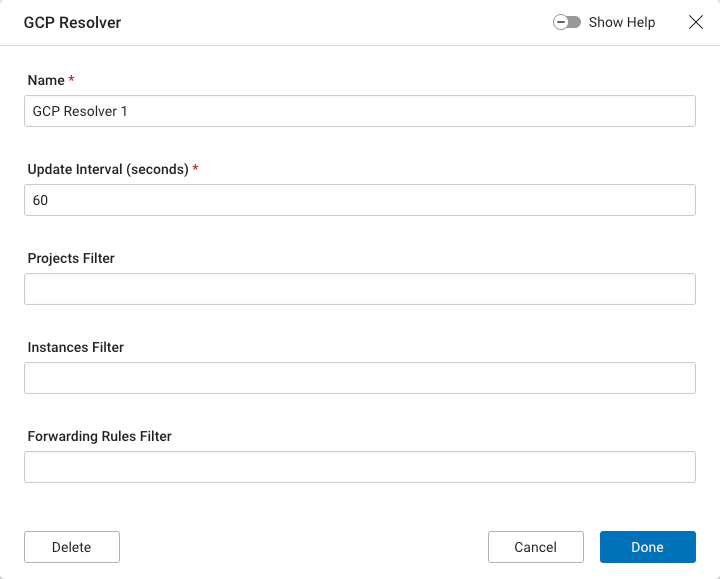
If you set these fields, AppGate ANDs them with the expressions defined in the entitlement actions. Use Site-level filters to limit query scope in large GCP deployments. When you troubleshoot resolver behavior, also verify the Site settings.
NOTE
If you do not set a projects filter in the Site or in the entitlement action, the resolver uses the project ID where the appliance is running.
The resolver supports the following syntaxes:
Common JSON syntax | Description |
|---|---|
| The Projects Filter syntax is defined in the GCP projects search. |
| The Instances Filter syntax is defined in the GCP instances aggregated list. |
| The Forwarding Rules Filter syntax is defined in the GCP forwarding rules aggregated list. |
| The Instances Network Tags filter is provided by AppGate ZTNA. |
| The Services Account Emails filter is provided by AppGate ZTNA. |
Note the following:
Google RE2 syntax does not support logical operators. For example,
gcp://{"instances-filter": "-labels.foo:* AND zone eq .*europe-west1-.*"}is not valid RE2. AppGate’s local parsing engine supportsANDand can combine Site level filters with action filters, but usingANDis not recommended. If the query falls back to GCP evaluation, it can fail.The resolver supports glob expressions for
service-account-emailsandinstances-network-tags. For example:gcp://{"instances-filter": "name:purple*", "service-account-emails": "appgate-service-account@appgate-dev.iam.?se[r-z]viceaccount.?om"}
Extra options
Public IP addresses: By default, the resolver returns private IP addresses. To return public IP addresses, add
"public-ips":true. For example:gcp://{"instances-filter": "-labels.foo:*", "public-ips":true}Zone and region filtering: GCP zone values are expressed as URL paths (for example,
projects/appgate-dev/zones/europe-west3-c). To simplify zone/region filters, AppGate supports variables such as${ZONE_PROJECT_URL}and${REGION_PROJECT_URL}that expand to the correct URL for the local parser. Example:gcp://{"projects-filter": "id:appgate-dev", "instances-filter": "-labels.foo:* AND zone:\"${ZONE_PROJECT_URL}europe-*\""}
Examples
These examples show how to use GCP syntax in AppGate ZTNA. For details on the expression language, see the documentation linked in the table above. Remember that Site-level filters are ANDed with action filters, which can change how an expression is evaluated
Common JSON syntax | Description |
|---|---|
| Resolves to private IPs from instances with |
| Resolves to private IPs from instances that have a label with key |
| Resolves to private IPs from instances that have a label |
| Resolves to private IPs from instances that do not have a label |
| Resolves to publics IPs from instances that do not have a label |
| Resolves to private IPs from instances with CPU Platform |
| Resolves to private IPs from instances in zones prefixed with |
| Using GCP's regexp (logical operators not allowed): resolves to private IPs from instances in zones prefixed with |
| Resolves to public IPs from forwarding rules with a name with the prefix |
| Resolves to public IPs from forwarding rules with a target with substring
|
| Resolves to public IPs from forwarding rules with
|
| Resolves to public IPs from forwarding rules in zones prefixed with
|
| Using GCP's regexp (logical operators not allowed): resolves to public IPs from forwarding rules in zones prefixed with
|
Illumio resolver
The Illumio resolver queries the Illumio platform REST API. It requires credentials with Reader access.
The resolver supports the following syntax:
Common JSON Syntax | Description |
|---|---|
| Resolves to private IP addresses of virtual machines with |
NOTE
In common JSON syntax,
label-valuescan be a list of lists. You can also model each list as a separate action. Within a single list, all labels must be present to match.
Extra options
Public IP addresses: By default, the resolver returns private IP addresses. To return only public IP addresses, add "public-ips":true. To return both private and public IP addresses, add a second Illumio target with "public-ips":true.
VMware vSphere resolver
The VMware vSphere resolver queries VMware vCenter using the VMware SDK for Go. It requires credentials with Reader access.
The resolver supports the following syntaxes:
Common JSON syntax | Description |
|---|---|
| Resolves to private IP addresses of virtual machines with name |
| Resolves to private IP addresses of all virtual machines in the folder named |
| Resolves to private IP addresses of all the virtual machines in the resource pool with the name |
| Resolves to private IP addresses of a virtual machine, folder, or resource pool with the tag name: |
NOTE
The resolver supports glob expressions for
VALUE(for example,esx://{"folders":"purple*"}).