This section describes recommended specifications and configurations for AppGate ZTNA appliances running in cloud or virtual environments. Appliance functions can be enabled independently, and specific combinations of functions are supported on a single appliance. Account for all enabled functions when sizing.
Plan for failover events. Gateways must have sufficient resources to handle the additional load from extra users during a failure. Additional vCPU is required for packet processing and event handling; additional RAM is required for users and the event queue. At a minimum, each Gateway should be able to handle its own load plus the load of one failed Gateway on the same Site.
Memory size (RAM)
AppGate ZTNA appliances include built-in checks that compare available memory against the selected functions. If memory is insufficient, the dashboard displays either an Info message (when memory is above 85 percent of the required value) or an Error message (when memory is below 85 percent).
Minimum memory requirements (test and non-production environments only)
The following values are the minimum memory requirements for each function to operate. Do not use these values for production environments — production deployments require considerably more memory to operate reliably.
Minimum memory requirements | ||||
|---|---|---|---|---|
Function | Standalone | Add LogForwarder | Add Gateway | Add LogServer |
+0GB | +1GB | +2GB | ||
Controller | 2GB | Yes | Yes | Yes |
Gateway | 2GB | Yes | Yes | |
LogForwarder | 1GB | Yes | ||
LogServer | 4GB | Yes | ||
Metrics Aggregator | 1GB | Yes | Yes | |
Connector | 1GB | Yes | ||
Portal | 4GB | |||
Production memory requirements
Appliance | AppGate ZTNA appliances automatically allocate RAM for appliance operations — daemons, OS, and so on — based on the size of the machine. A small machine (4 vCPU / 8 GB) allocates approximately 2 GB for appliance operations. A large machine (32 vCPU / 64 GB) allocates approximately 6 GB. This allocation scales with installed RAM and vCPU count, and is most pronounced for Controllers and Gateways, which are designed for multi-threading and use Java, which is memory-intensive. This base requirement applies regardless of which functions are enabled; enabled functions require additional RAM on top of this. | ||||||||||||||||||||||||||||||||||||||||||||||||||||||||||||||||||||||||||||||||||||||||||||||||||||||||||||||||||||||||||||||||||||||||||||||||||||||||||||||||||||||||||||||||||||||||||||||||||||||||||||||||||||||||||||
Controller | The Controller is transactional and uses memory only while issuing tokens. Because Controllers handle only tens of transactions simultaneously, memory usage does not grow significantly. For production systems, allow 4–6 GB for the Controller function depending on the size of the user base. A small Controller should be specified with a total of 6 GB (2 GB appliance + 4 GB function). Larger machines supporting a larger user base should be specified with up to 12 GB total (6 GB appliance + 6 GB function). Collective replication adds transient memory pressure on target Controllers when processing large numbers of entities. Memory usage increases with the number of replicated entities but stabilizes at higher volumes. Ensure sufficient memory is available when performing large replications during peak hours.
| ||||||||||||||||||||||||||||||||||||||||||||||||||||||||||||||||||||||||||||||||||||||||||||||||||||||||||||||||||||||||||||||||||||||||||||||||||||||||||||||||||||||||||||||||||||||||||||||||||||||||||||||||||||||||||||
Gateway | The analysis for Gateways was performed on version 6.3. Earlier versions — particularly those prior to version 6.2.2 — do not include all the optimizations present in later versions and can consume considerably more RAM than the values shown here. Beyond the appliance base RAM requirement, a Gateway's RAM usage consists of two additional elements: user rules ( User rulesRAM usage is primarily determined by:
For smaller deployments (below 1,000 users and 1,000 rules), allow 10 KB for every user-rule. A 4 vCPU / 8 GB machine with 4 GB allocated for rules can support approximately 1,000 users with 400 rules each. For larger deployments, efficiency increases as user and rule counts grow. At 1,000 users and 1,000 rules, allow 5 KB per user-rule. As the numbers increase further, this can be reduced to as little as 2 KB per user-rule. A 16 vCPU / 32 GB machine with 24 GB allocated for rules can support approximately 6,000 users with 2,000 rules each. The following table summarizes user-rule memory allowances:
10KB per user-rule 5KB per user-rule 2KB per user-rule
Event handling and the event queueAppGate ZTNA is designed to respond to changes in resolved names, such as when an auto-scaled instance is added. It is not designed to handle large numbers of frequently changing resolved names — for example, when a hostname incorrectly points to a round-robin DNS load balancer and returns a different result on every lookup. Gateways run a dynamic queuing system to handle these changes on a per-user basis. If 500 users each have 20 actions that change simultaneously, the queue immediately reaches 10,000 entries. Larger Gateways support larger queues, and faster Gateways process queues more quickly, but host definitions should still resolve to consistent values appropriate for the scale of your deployment. The following table shows how the maximum event queue and worker threads scale with installed memory:
Event handling requirements are difficult to estimate. A system where users sign in and access only static protected hosts with no additional conditions or evaluations generates very few events. A system with frequently re-evaluated conditions or dynamic protected hosts can generate many more.
The following table provides initial sizing guidance. Systems with more users and entitlements typically have greater event complexity, so an initial value of 1 MB per user is suggested:
0.5MB per user 1MB per user 2MB per user Overall RAM requirementGiven the number of variables involved, a single definitive answer is not possible. Measuring RAM requirements for a small deployment on a large appliance is not meaningful, as the appliance base usage dominates. Similarly, a system with a large static ruleset has very different RAM requirements from one with a highly dynamic ruleset. For the Ax-G5 appliance (16 GB RAM), the following user-rule combinations apply:
For example, at 1,000 users and 2,000 entitlements, the appliance uses approximately 3 GB, rules use approximately 10 GB, and events use approximately 1 GB — totaling 14 GB, which fits within the 16 GB available. For the Ax-H4 appliance (64 GB RAM), the following user-rule combinations apply:
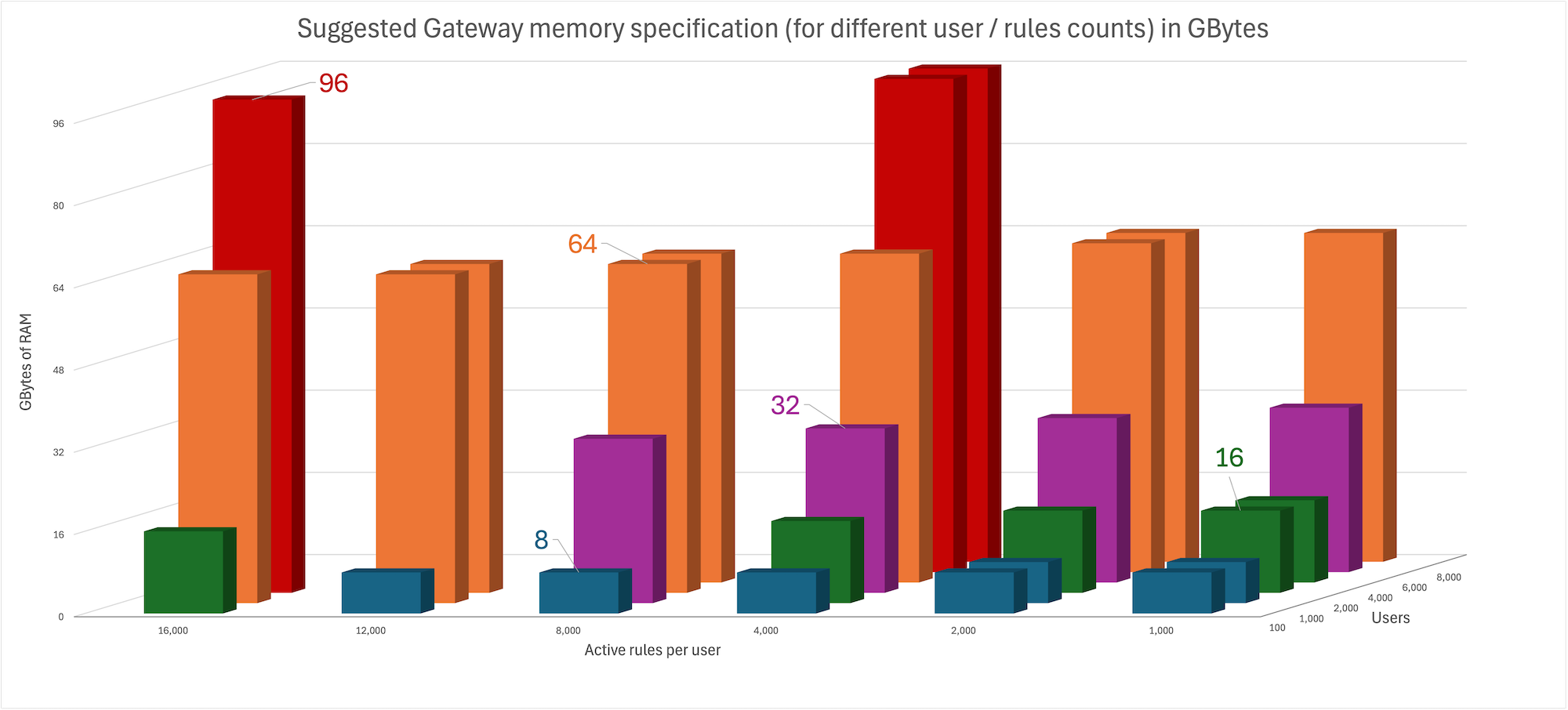
For deployments with 1,000 or more rules per user, Gateways can start to consume significant amounts of RAM. Use the chart in the admin UI to determine how many rules and users a given RAM size supports.
For example, if you plan on 2,000 users per Gateway with approximately 4,000 rules each, specify a 32 GB instance. Fallback SiteThe client controls the fallback process. After a minimum period of 30 seconds, the client determines whether a Site is unresponsive and switches to the fallback Site. To make this transition seamless, FailoverDuring a failover — for example, during an upgrade — additional load is applied to Gateways. Add an allowance for this when sizing. The exact amount depends on the Collective design and the number of Gateways in the Site. | ||||||||||||||||||||||||||||||||||||||||||||||||||||||||||||||||||||||||||||||||||||||||||||||||||||||||||||||||||||||||||||||||||||||||||||||||||||||||||||||||||||||||||||||||||||||||||||||||||||||||||||||||||||||||||||
Connector | The Connector uses more RAM as the number of configured resource group clients increases. Allow 2 GB for the appliance plus 25 MB for every client configured (an extra 1 GB supports approximately 40 clients). A maximum of 60 clients is supported on one Connector. | ||||||||||||||||||||||||||||||||||||||||||||||||||||||||||||||||||||||||||||||||||||||||||||||||||||||||||||||||||||||||||||||||||||||||||||||||||||||||||||||||||||||||||||||||||||||||||||||||||||||||||||||||||||||||||||
LogForwarder | The LogForwarder uses more RAM when configured in performance mode because logs are stored in RAM rather than on disk. Allow 2 GB for the appliance plus 250 MB for performance mode. | ||||||||||||||||||||||||||||||||||||||||||||||||||||||||||||||||||||||||||||||||||||||||||||||||||||||||||||||||||||||||||||||||||||||||||||||||||||||||||||||||||||||||||||||||||||||||||||||||||||||||||||||||||||||||||||
Metrics Aggregator | The Metrics Aggregator runs only core services. Allow 2GB for the appliance. | ||||||||||||||||||||||||||||||||||||||||||||||||||||||||||||||||||||||||||||||||||||||||||||||||||||||||||||||||||||||||||||||||||||||||||||||||||||||||||||||||||||||||||||||||||||||||||||||||||||||||||||||||||||||||||||
LogServer | The LogServer can use all available memory. For production use, specify at least 16 GB total. For medium-scale environments or deployments that run complex reports extensively, specify 32 GB total. LogServers must also remain within the production use operational parameters. | ||||||||||||||||||||||||||||||||||||||||||||||||||||||||||||||||||||||||||||||||||||||||||||||||||||||||||||||||||||||||||||||||||||||||||||||||||||||||||||||||||||||||||||||||||||||||||||||||||||||||||||||||||||||||||||
Portal | Allow 2GB for the appliance plus 2GB per 25 users for production use. | ||||||||||||||||||||||||||||||||||||||||||||||||||||||||||||||||||||||||||||||||||||||||||||||||||||||||||||||||||||||||||||||||||||||||||||||||||||||||||||||||||||||||||||||||||||||||||||||||||||||||||||||||||||||||||||
NOTE
Always specify sufficient memory. AppGate ZTNA does not use disk caching when memory is low. When memory is exhausted, the system behaves unpredictably.
Disk size and type
Size
The base appliance does not require a large disk. Image and state sectors occupy 5 GB for the primary partition and 5 GB for the secondary partition. Local logs use a maximum of 4 GB.
The Controller requires additional space for the database. For most deployments this is modest, but larger systems may approach 10 GB. During Controller upgrades, one or more image downloads, two partitions, and two or more running Controller instances (with their databases) can multiply disk usage quickly. Specify 100 GB of disk space for production Controller deployments to provide overhead in the event of issues..
The Gateway, LogForwarder, Metrics Aggregator, Portal and Connector require no additional disk space beyond the base appliance, as they store only temporary log records. 20–30 GB is sufficient.
The LogServer may require significant space for the OpenSearch database. Specify a minimum of 128 GB. LogServers must also remain within the production use operational parameters.
Increasing disk size
All supported cloud platforms support lvmresizer, which automatically increases the size of the data volume. Shut down the appliance, resize the disk in the cloud console, and restart the appliance. Any new unpartitioned space at the end of the existing volume is added to the data volume. You can also increase disk space from the command line. Refer to Increasing appliance disk size.
Type
Appliances make frequent small writes to disk, but the total data written at any one time is small. A SATA interface provides adequate performance for an AppGate ZTNA appliance; a SAS interface offers no additional benefit. However, the IOPS requirements of a large, busy AppGate ZTNA appliance exceed the performance of conventional spinning disks.
If Guaranteed Logging is enabled on a large, busy appliance, a significant performance degradation occurs when the disk IOPS limit is reached.
Controllers and LogServers can become very busy in large Collectives, particularly when scripting, API calls, or upgrades are in use. Always specify SSD disks for Controllers and LogServers. For AWS, use EBS-optimized instances. Disk caching has also shown significant performance benefits and should be enabled where possible. Faster bus speed also improves performance noticeably.
I/O
Controllers handle tokens at a modest rate, so a 1 Gb/s NIC is sufficient. For all appliance functions, consider audit log traffic volume — it can be substantial. Under failure conditions, users retrying failed connections can significantly increase the volume of log messages.
I/O matters more for Gateways than for any other appliance function. A Gateway with sufficient vCPU is constrained by I/O, so specify accordingly. When running virtualized Gateways, configure the host to use SR-IOV — this reduces CPU load and increases throughput.
Instance sizing (CPU)
Virtualized Controllers require sufficient CPU to prevent frequent context switching. Instances with 2–4 vCPU can be overwhelmed by inbound connections in busy Collectives. Instances with 8–12 vCPU are the optimal range. Instances with 16 vCPU do not suffer from context switching but are instead limited by the speed and latency of inbound connections and the Controller architecture.
Complex policy and entitlement configurations are not improved by adding more vCPU, as they are limited by other factors such as disk performance. For very complex configurations (10,000 or more policies), there is little difference between eight and 16 vCPU. In high-concurrency environments, specifying machines in the 16–20 vCPU range provides some benefit.
Typical Controller performance figures are as follows:
Cloud Controller (correctly specified): approximately 4–6 users per vCPU per second
Low-latency virtualized Controller: approximately 8–10 users per vCPU per second
Well-specified physical appliance: approximately 12–14 users per vCPU per second
These figures do not account for external factors such as identity provider communication or assignment criteria and user claim scripts.
During Collective replication, avoid running large replications on minimally sized Controllers, as they experience sharp CPU increases. Adding CPU improves replication speed.
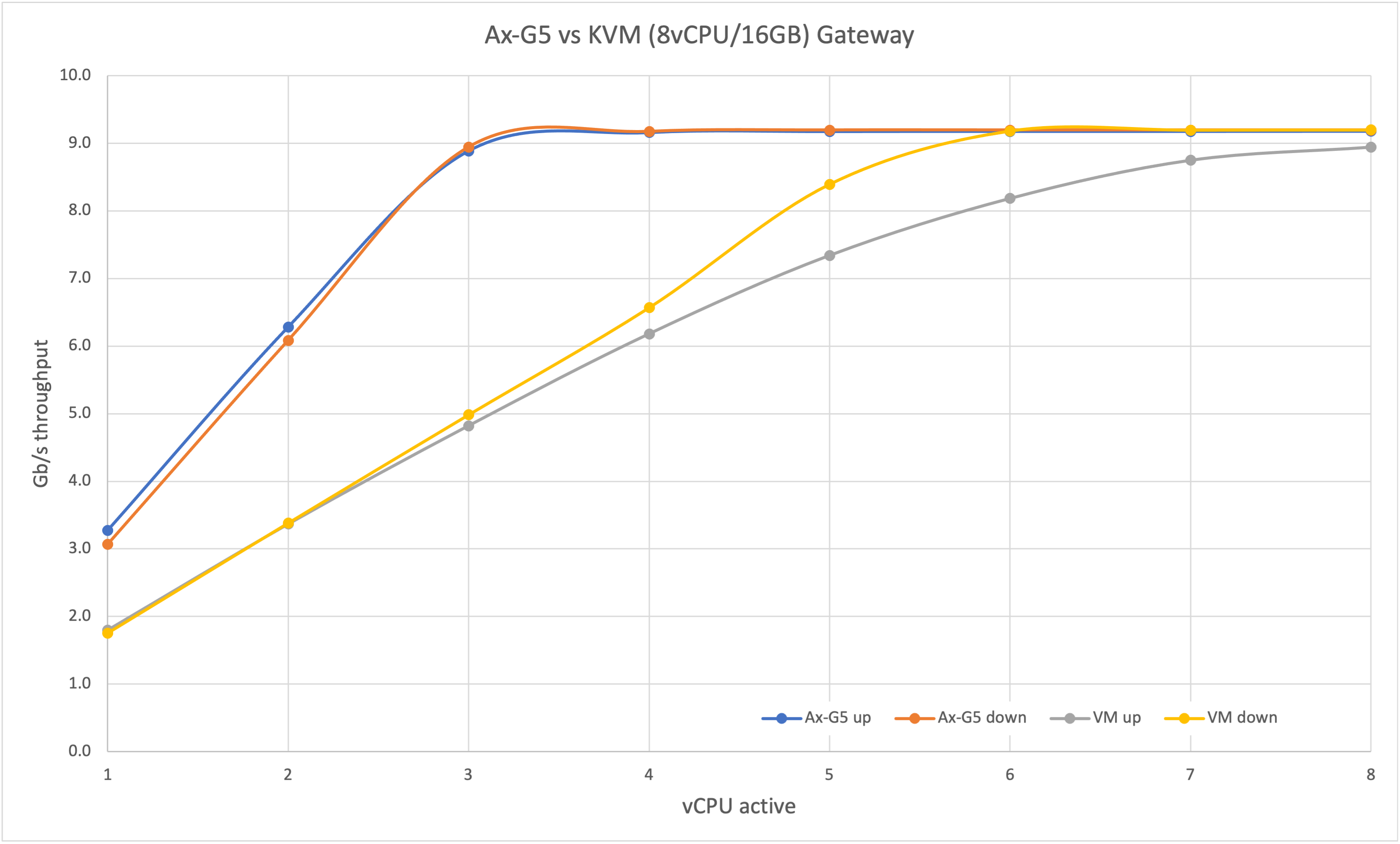
Virtualized Gateways use vCPUs approximately half as efficiently as hardware appliances for a given throughput. Allow approximately 1 vCPU per 1 Gb/s of throughput. The maximum expected throughput from a single virtualized Gateway is 10 Gb/s (using eight or more vCPU at near 100 percent). For throughput above 10 Gb/s, use multiple Gateways. Do not use more than four Gateways on a single virtual host, as this deprives the host of key resources. For event handling, a virtualized Gateway can manage approximately 6 events per vCPU per second. Allow approximately 1–2 vCPU per 1,000 users for event handling.
The Portal is not included in the instance sizing table below, as it is typically not deployed in the cloud. If specifying a Portal on a virtual host, start with 2 vCPU and add 1 vCPU per 25 users.
The LogForwarder and Metrics Aggregator are not included in the table below, as they are lightweight and can be added to any appliance without changing the specification.
The Connector is not included in the table below, as it is typically not deployed in the cloud. If specifying a Connector on a virtual host, start with 2 vCPU. Add another 2 vCPU if throughput above 1 Gb/s is required or if more than 10 clients are configured.
The following table provides CPU sizing guidance. It assumes each user has fewer than 100 rules (individual entitlements). See the RAM section above for more information about memory usage.
REF | Controller | Gateway | Controller + Gateway | LogServer | Portal | Azure type [core/mem] | AWS type [core/mem] | GCP type [core/mem] |
|---|---|---|---|---|---|---|---|---|
sign-in/min ~ | MAX users@speed | sign-in/min ~ max users@speed | usage | users |
|
|
| |
A | Testing | Testing | - | - | - | Standard_A1_v2 [1/2] | t2.small [1/2] | e2-small [2/2] |
B | 200 | 500 | Testing | Testing | Testing | Standard_B2s / Standard_A2_v2 [2/4] | t2/t3(a).medium [2/4] | e2-medium [2/4] |
C | 400 | 500@1Gb/s^ | 200 / 250@1Gb/s^ | - | - | Standard F2s_v2 [2/4] | c5/c6i.large [2/4] | c2(d)-highcpu-2 [2/4] * |
D | 1000 | 2000@1-2Gb/s^ | 500 / 1000@1-2Gb/s^ | - | 75 | Standard F4s_v2 [4/8] | c6i.xlarge [4/8] | c2(d)-highcpu-4 [4/8] * |
E | - | - | - | Production | - | Standard D4s_v3/v4 [4/16] | m5/m6i.xlarge [4/16] | n2(d)-standard-4 [4/16] |
F | >2000 | 4000@2-4Gb/s^ | 1000 / 2000@2-4Gb/s^ | Production | 150 | Standard F8s_v2 [8/16] | c5/c6in.2xlarge [8/16] | c2(d)-highcpu-8 [8/16] * |
G | >4000 | 6000@6-8Gb/s^ | 2000 / 3000@6-8Gb/s^ | Production | 300 | Standard F16s_v2 [16/32] | c5/c6in.4xlarge [16/32] | c2(d)-highcpu-16 [16/32] * |



This table provides guidance for typical use cases and assumes AES-NI is in use. To check the CPU type, run cat /proc/cpuinfo. Intel CPU family three and later support AES-NI. The dashboard displays a warning when a CPU without AES-NI support is detected.
Example: The Azure F8s_v2 has eight vCPU — four to support 4,000 users and four for 4 Gb/s throughput. This configuration supports approximately 20 events per second (one event per user per three minutes). If an IP address change affects all 4,000 users simultaneously, processing can take approximately three minutes.
* Selecting the "standard" variant provides more RAM.
^ The CPU can sustain these speeds; however, actual network speed may vary on some instance types.
~ Includes token renewals as well as initial sign-ins.
For installation instructions for these environments, refer to the documentation in the respective cloud provider marketplaces.